Why Signing Your Cover Letter Matters
In the competitive world of job applications, every detail counts. Your cover letter is your chance to make a strong first impression and demonstrate your professionalism. One seemingly small element that often sparks debate is whether or not to sign your cover letter. The answer, as with many aspects of job hunting, isn’t always straightforward, but understanding the ‘why’ behind signing can significantly impact your application’s effectiveness. A well-placed signature can communicate several key qualities that employers value, making your application stand out from the stack. It shows that you’ve taken the extra step to personalize your application. This not only conveys your attention to detail but also shows your commitment to the opportunity, thus showcasing that you are a serious candidate. Therefore, understanding the significance of a signature is crucial in today’s job market.
The Impact of a Signature
The act of signing a cover letter, whether digitally or physically, has a subtle but impactful effect. It can add a layer of authenticity and personal connection that elevates your application. While digital applications are common now, a signature can distinguish your application from those that have been mass-produced. This small gesture can make a considerable difference in the eyes of a hiring manager who may be overwhelmed by generic, unsigned cover letters. Additionally, a signature can serve as a subtle reinforcement of your brand, leaving a memorable impression. A signature is more than just a formality; it’s an opportunity to show your commitment to the role and your attention to detail. It is a symbol of your dedication, which is what employers often look for.
Professionalism and Attention to Detail

One of the primary benefits of signing a cover letter is that it conveys professionalism and attention to detail. These are both traits that employers universally value. Signing your cover letter, especially when it’s submitted in a format where a signature is feasible (such as a PDF), shows that you’ve put in the extra effort. It demonstrates your commitment to the job. It’s a visual cue that you’ve paid close attention to the details, ensuring that your application is polished and complete. It also signifies that you are serious about the opportunity, something that hiring managers are looking for in a potential candidate. By taking this extra step, you signal that you understand the importance of presenting yourself professionally and are willing to go the extra mile. This can often set you apart from candidates who may have simply submitted a generic application.
Authenticity and Personal Connection
In the digital age, where impersonal communication is the norm, a signed cover letter can add a touch of authenticity and personal connection. A signature transforms a document from a mere piece of text into a tangible expression of your identity. The small act of signing can create a sense of intimacy, making you feel more approachable. This can make a significant difference in how the hiring manager perceives your application. A personalized application can distinguish you as a candidate, leading to more opportunities. While not always necessary, a signature can create a subtle but impactful connection with the reader, humanizing your application and fostering a positive impression. This subtle human touch can make a big difference in the competitive job market, making you more memorable and giving you a slight edge over unsigned applications.
When to Sign Your Cover Letter
Knowing when to sign your cover letter is just as important as understanding why you should sign it. The context of your application—whether it’s digital or physical, emailed, or submitted through an online portal—dictates the best approach. The primary consideration is the format of your application. In many cases, the answer is simple: if your cover letter is in a format that supports a signature, you should sign it. This typically includes printed letters, PDFs, and sometimes even in the body of an email. However, the method of signing varies depending on the circumstances. For instance, you will need to use a digital signature if you are sending an email and a physical signature if the application is on paper. Therefore, make sure you know how to do it right for the maximum benefit.
Digital Signatures

Digital signatures have become increasingly common and accepted in modern job applications. They offer a convenient and professional way to sign your cover letter, especially when submitting applications online. Digital signatures come in various forms, from scanned images of your handwritten signature to more sophisticated encrypted signatures. The most important thing is that they appear professional and are easy to read. Adding a digital signature is often simple. You can insert an image of your signature in your document. Ensure the image is clear and appropriately sized. If you want to go the extra mile, you can use tools to create a secure digital signature, which can increase the trustworthiness of your document. The key to using digital signatures effectively is to ensure that they are professional, legible, and appropriate for the application format. Make sure you are using the right type of signature for your application.
E-signatures for Online Applications
Many online application platforms support e-signatures, making it easy for you to sign your cover letter directly within the system. The specifics will vary depending on the platform. In some cases, you may simply upload an image of your signature. In others, the platform may have a built-in tool that allows you to draw your signature. Whether you are using a web platform or online software, make sure you follow the specific instructions of the application portal. If you are not sure how to proceed, check the platform’s help documentation or contact the company directly for guidance. The key is to choose a method that feels natural and demonstrates your attention to detail. Regardless of which method you choose, make sure that your e-signature appears professional and is easy to read.
Physical Signatures
In the rare instances where you are submitting a physical copy of your cover letter, a physical signature is the obvious choice. A physical signature adds a personal touch and reinforces the message that you are taking the application seriously. You can simply sign the letter with a pen after printing it. The key is to make sure the signature is legible and reflects your personality. You can use a pen that matches the color of the text or use a color that stands out, depending on the type of company or role you are applying for. If you have the option, consider using a quality pen and signing with a confident stroke. This small detail can make a significant difference in the visual impact of your application. A physical signature is a traditional approach, but it is often appreciated by employers looking for candidates who pay close attention to details.
When a Signature May Not Be Necessary

While signing your cover letter is often a good practice, there are circumstances where it may not be necessary or even appropriate. For instance, if you’re submitting your application through a system that automatically generates a cover letter or that explicitly asks you not to include a signature, then it’s best to comply with the platform’s guidelines. Moreover, in some industries or applications, a signature is not customary. In these cases, it’s essential to use your judgment and consider the norms of the job and company. If you’re unsure, it’s always best to err on the side of caution. If you’re unsure whether you should sign your cover letter, you can contact the company to find out what its policy is. However, in most cases, you can sign your cover letter without any problems.
Email Cover Letters
For email cover letters, the approach to signing is a little different. Instead of a physical signature, you can add a digital signature. You can also simply include your typed name at the end of the letter. In this context, your signature is more about presenting your name and contact information in a clear, organized manner. You can sign the email with a digital signature, insert an image of your signature, or simply include your typed name at the end of the letter. The most important thing is to provide your contact information so that the hiring manager can contact you. Make sure to include your phone number, email address, and LinkedIn profile if you have one. Therefore, make sure that you tailor your approach to the type of job and the format of the application.
ATS (Applicant Tracking Systems) Considerations
Applicant Tracking Systems (ATS) are widely used by companies to manage applications. These systems can sometimes present challenges when it comes to signatures. When applying through an ATS, it’s essential to consider how the system handles signatures. Many ATS systems may not support digital signatures or may strip out formatting from your document. In such cases, including your typed name at the end of your cover letter is often the safest option. If the ATS allows for it, you may be able to upload a separate document with your signature. If you’re unsure, it’s best to avoid adding a signature or to follow the ATS guidelines. While a signature can add a nice touch, the primary goal is to ensure that your application is readable and that the ATS can parse it. Therefore, you need to know what type of ATS is used and how it handles signatures.
Alternative Approaches and Best Practices

In addition to the basic considerations, there are several alternative approaches and best practices to keep in mind. These strategies can help you to make your cover letter even more effective. To create a successful cover letter, you need to go beyond the basics and tailor your approach to fit the job and the company. This can include incorporating digital signatures, using your typed name, and providing a professional closing. To make sure you do a good job, always prioritize clarity and readability. Remember, your cover letter is the first chance you have to make a good impression, so you want to be as professional as possible. Consider what your company is looking for, and then tailor your approach to fit its expectations. Here are a few additional tips to help you make your cover letter as effective as possible.
Formatting Your Cover Letter Signature
Proper formatting is crucial for any effective signature, whether it’s digital or physical. The goal is to create a clean, professional appearance. It’s best to be consistent with the font and style used in the rest of your cover letter. Ensure the signature is legible and easy to read. If you’re using a digital signature, make sure the image is clear and appropriately sized. If you’re including your typed name, use a font size that matches the rest of your letter. The formatting you use will make an immediate impression on the hiring manager. Therefore, you need to ensure it is clear and easy to read. To create a successful cover letter, make sure you use the right font and size, and that your signature is consistent with the other elements of your cover letter.
Signature Placement
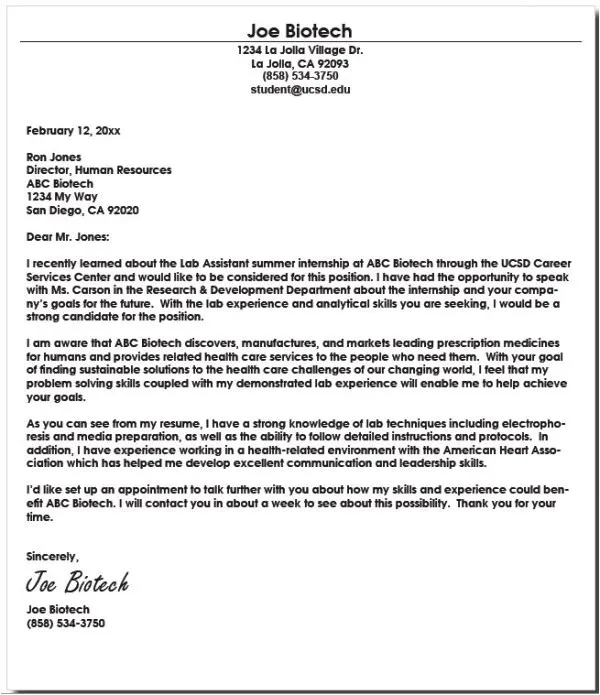
The placement of your signature is also important. The most common and accepted placement is at the end of your cover letter, directly above your typed name. This follows the standard practice for business letters. The signature should be placed on the left or centered, but never on the right. If you are using a digital signature, it’s recommended to place it just above your typed name. This keeps the formatting clean and professional. The signature block should be well-aligned with the rest of your content. Using proper placement helps to ensure your application is easy to read and professional. It also helps to make the signature stand out, while not distracting from the rest of the cover letter.
Font and Style

The font and style of your signature should complement the overall tone of your cover letter. The most important thing is to maintain consistency throughout your application. For a professional look, you can use a simple and classic font. A signature should be in a font that matches the rest of the cover letter. The font should be legible and not too ornate. You may want to consider using a slightly different font than the one you used in the rest of your cover letter. This can help the signature stand out. However, make sure that the font is still easy to read. A good practice is to keep the font size consistent with the rest of your letter. Therefore, by maintaining the right font, you can add a professional touch to your cover letter.
What to Include in Your Signature Block
Your signature block should include several key pieces of information. This typically includes your typed name, contact information, and possibly your professional title or designation if applicable. Your typed name is the most important part of the signature block, as it provides a clear and accurate representation of your identity. The best practice is to type your full name, including your middle name if you normally use it. Your contact information should include your phone number, email address, and LinkedIn profile. It’s crucial to make it easy for the hiring manager to reach you. If you have a relevant professional title or designation, you can also include it below your name. This shows the hiring manager your professional status. Therefore, providing these details in a clear and organized way can make it easy for the hiring manager to contact you.
Your Typed Name
Including your typed name is a crucial element of your signature block. This clarifies your identity and ensures that the hiring manager knows exactly who you are. Your typed name should be placed directly below your signature, whether it’s a digital image or a scanned copy of your handwritten signature. Use a professional font and style. Make sure that the font size matches the rest of your cover letter. Your typed name should be easy to read, and it should match the name you used on your resume. This helps to ensure that there are no misunderstandings about your identity. It’s an important part of your cover letter, so make sure you give it the attention it deserves. A well-formatted typed name can add a nice touch of professionalism to your application.
Contact Information

Make sure that you include your contact information in the signature block. This includes your phone number, email address, and LinkedIn profile (if you have one). Provide this information in a clear and organized way, making it easy for the hiring manager to reach you. The purpose of the contact information is to enable the hiring manager to reach you quickly. If the hiring manager wants to learn more about you, then this is the most immediate way to do so. Make sure that the contact information is up to date. Therefore, make sure you verify this information to ensure it is current and correct. Having the proper contact information is the best way to ensure a smooth and timely hiring process.
Avoiding Common Mistakes
There are some common mistakes to avoid when signing your cover letter. These errors can undermine your efforts and make you look less professional. The goal is to show professionalism and attention to detail. The most important thing is to proofread your letter carefully before submitting it. A sloppy signature can leave a negative impression. Ensure that your signature is in a format that is appropriate for the application. Avoiding common mistakes is essential to make sure your cover letter has the best chance of success. Here are a few common mistakes to avoid.
Illegible Signatures
An illegible signature can be one of the biggest pitfalls when signing your cover letter. If the hiring manager can’t read your signature, it can create confusion and make you appear less professional. When including your signature, make sure that it is legible. Whether you are using a digital signature or a handwritten one, the goal is to be easy to read. Test your signature to make sure that it is clear and easy to understand. Make sure that your signature is consistent. If you use a different signature each time, this can be confusing. Using a consistent and legible signature is a key part of your overall professional appearance. Therefore, always make sure that the signature is easy to read.
Incorrect Placement
Incorrect placement of your signature can also create a negative impression. Your signature should follow the standard business letter format. That typically means that it is at the end of the letter and just above your typed name. Make sure you do not place your signature in the wrong spot. Always follow the recommended format. Make sure you position your signature on the left or center side of the document, never on the right. A poorly positioned signature can look unprofessional. If the placement is off, the hiring manager might think that you do not pay attention to detail. Therefore, make sure that you take the time to correctly position your signature.
Inconsistency Across Applications
Inconsistency across applications is a mistake you will want to avoid. Make sure you use the same approach for each application. This could be a consistent digital signature, an image of your handwritten signature, or simply your typed name. Using a different approach for each application can make it seem as though you are not organized. Choose a signature style and stick with it. This will enhance your brand and will demonstrate to the hiring manager that you are consistent in your approach. Inconsistency can create the wrong impression. Therefore, always make sure you use a consistent approach to your signature for all applications.
Conclusion
The decision of whether to sign your cover letter often depends on the format of your application, the norms of the industry, and your personal preference. However, in most cases, a well-placed signature can be a simple yet effective way to elevate your application and make a positive impression. Whether you choose to use a digital signature or a physical one, the key is to ensure that it’s professional, legible, and consistent with your overall application. By paying attention to the details and following these best practices, you can increase the chances of your cover letter making a lasting impression. Therefore, taking a few extra moments to refine the signature on your cover letter could be the small detail that sets you apart from other applicants. Therefore, sign your cover letter when you can. It is the best way to help your application stand out.