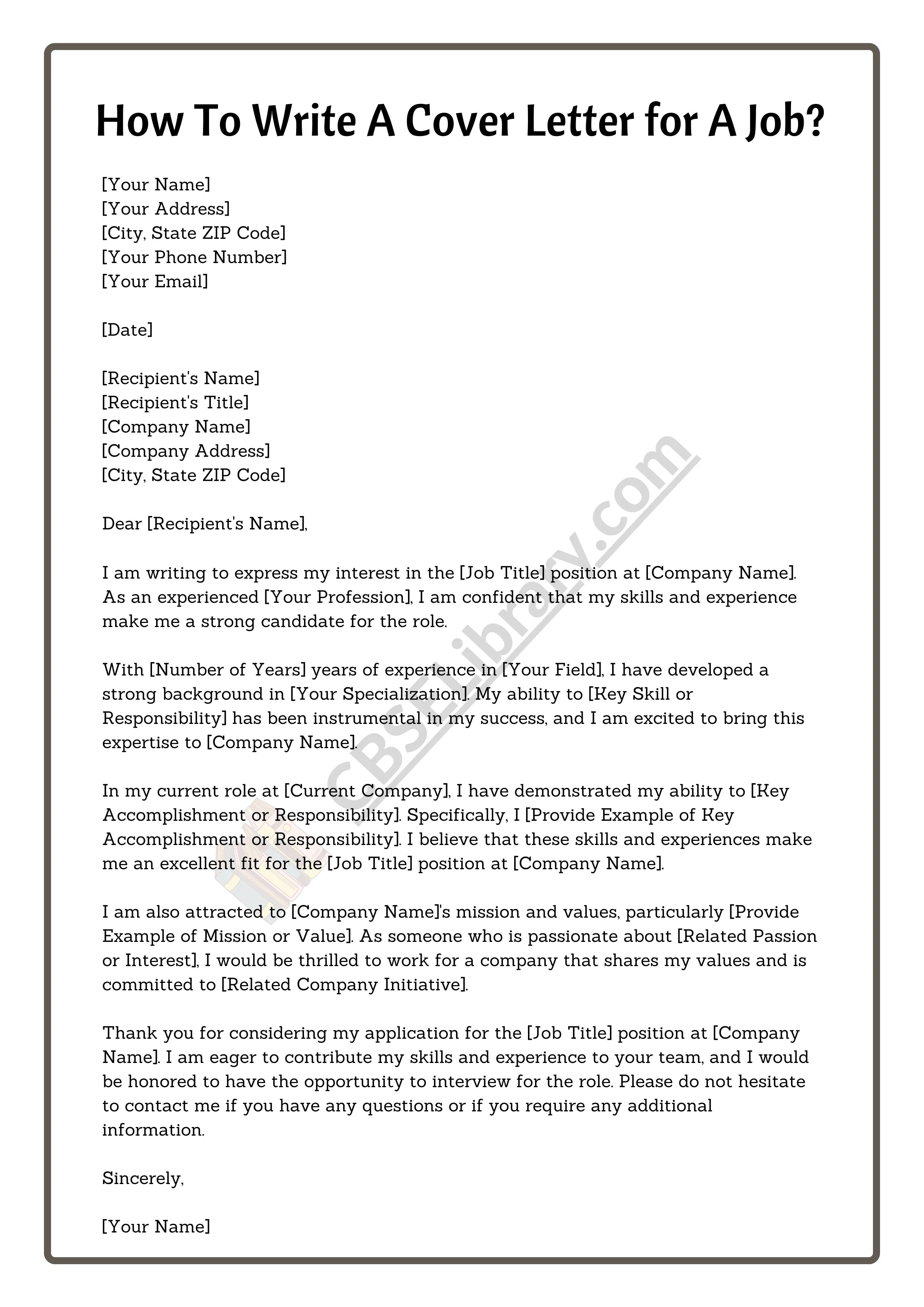
Cover Letter Basics
A cover letter is a crucial document that accompanies your resume when applying for a job. It serves as an introduction, allowing you to showcase your personality, skills, and enthusiasm for the position. Unlike a resume, which provides a factual overview of your experience, a cover letter gives you the opportunity to explain why you are the perfect fit for the specific role and company. A well-crafted cover letter can significantly increase your chances of landing an interview by making a strong first impression and highlighting your unique qualifications. A strong cover letter is a must for making a good impression.
What Is a Cover Letter?
At its core, a cover letter is a formal document sent to a potential employer along with your resume. Its primary purpose is to express your interest in a job and to provide more context and detail about your qualifications than your resume alone can offer. It is a chance to demonstrate your writing skills, personality, and how well you understand the job requirements and the company’s values. Consider it your personal sales pitch, designed to persuade the hiring manager that you are the ideal candidate for the role. It should be customized for each application.
Why Is a Cover Letter Important?

A cover letter is important because it gives you a platform to highlight your key skills and experiences in a way that directly addresses the job requirements. It allows you to connect your qualifications to the specific needs of the employer, demonstrating how you can contribute to their success. Cover letters also show your genuine interest in the position and the company, which can set you apart from other applicants. In many cases, a well-written cover letter can compensate for a less-than-perfect resume by emphasizing your strengths and potential. It also helps you make a strong impression by providing a personal touch.
Key Components of a Cover Letter
Contact Information Section
The contact information section should be at the top of your cover letter. It should include your full name, address, phone number, and professional email address. Ensure that your email address sounds professional and is easy to read. If you have a LinkedIn profile, you can also include a link to it here. This section ensures that the employer can easily reach you if they decide to move forward with your application. It’s also the standard format for a professional business letter.
Date and Recipient Information

Below your contact information, include the date. Following the date, you should include the hiring manager’s name, title, and the company’s address. If you are unable to find the name of the hiring manager, you can use a general greeting like ‘Hiring Manager’ or ‘Recruiting Team.’ If you’re applying online and do not know the company’s address, you can skip this part, but always try to find the hiring manager’s name to make the letter more personal and effective.
Greeting the Hiring Manager
Start your cover letter with a professional greeting. Using the hiring manager’s name is ideal; for example, ‘Dear Mr. Smith’. If you don’t know the name, use a more general greeting like ‘Dear Hiring Manager’ or ‘Dear [Company Name] Recruiting Team’. Avoid generic greetings like ‘To Whom It May Concern’ as they can make your letter seem impersonal. Personalizing your greeting demonstrates that you’ve taken the time to research the company and the role, which is a sign of genuine interest.
The Body of Your Cover Letter
First Paragraph Grab Attention

The first paragraph of your cover letter is your opportunity to grab the hiring manager’s attention. Clearly state the position you are applying for and where you saw the job posting. You can also include a brief statement about why you are interested in the role and the company. This paragraph should be concise and compelling, setting the tone for the rest of your letter and immediately showcasing your enthusiasm. A strong opening sets a positive impression.
Highlight Relevant Skills and Experience
In the body of your cover letter, you should highlight your most relevant skills and experiences. Use the job description to identify the key requirements and tailor your examples to match. Provide specific examples of how you have successfully used these skills in the past and what results you achieved. Quantify your accomplishments whenever possible to demonstrate the impact of your work. This section should demonstrate that your skills and experience align well with the job requirements.
Showcase Your Accomplishments
Instead of simply listing your job responsibilities, focus on your accomplishments. Use action verbs to describe your achievements and quantify your results whenever possible. For instance, instead of saying ‘Managed social media accounts’, you could say ‘Increased social media engagement by 30% in six months by implementing a new content strategy’. This approach demonstrates your value and the impact you can make in the role. Showcasing your accomplishments is a great way to show your achievements.
Tailoring Your Cover Letter to the Job

Researching the Company and the Role
Before writing your cover letter, research the company and the specific role. Understand the company’s mission, values, and recent news. Tailor your letter to show how your skills and experience align with their needs and culture. Demonstrate your understanding of the role by addressing the key responsibilities and requirements outlined in the job description. This research will allow you to write a more targeted and compelling cover letter, demonstrating your genuine interest in the opportunity. Make sure you have a good overview of the job and the company.
Using Keywords from the Job Description
Carefully review the job description and identify the keywords used to describe the required skills and experience. Incorporate these keywords into your cover letter naturally. This helps the hiring manager quickly see that you meet the job’s requirements and also helps your application pass through applicant tracking systems (ATS) which scan for keywords. Ensure that you use the keywords in context and that the letter flows naturally. Make sure to use the right keywords.
Writing a Strong Closing Paragraph

Expressing Enthusiasm and Next Steps
In the closing paragraph, reiterate your interest in the position and the company. Express your enthusiasm for the opportunity and your confidence in your ability to contribute to the team. Include a call to action by stating that you are eager to discuss your qualifications further and are available for an interview. Thank the hiring manager for their time and consideration. This ensures that your cover letter ends on a positive and proactive note. A good closing is a must for a cover letter.
Proofreading and Editing
Checking for Grammar and Spelling Errors

Before submitting your cover letter, thoroughly proofread it for any grammar and spelling errors. Use a grammar checker, but also read through the letter carefully yourself. Errors can make your letter appear unprofessional and can undermine your credibility. It’s a good idea to have a friend or colleague review your cover letter as well, as they may catch errors you missed. This attention to detail shows professionalism.
Ensuring a Professional Tone
Maintain a professional tone throughout your cover letter. Use formal language and avoid slang or overly casual expressions. Focus on demonstrating your skills, experience, and enthusiasm in a clear and concise manner. Ensure your writing style is appropriate for the company culture. A professional tone ensures the letter communicates effectively and presents you in a positive light. Maintaining a professional tone is a must in any business environment.
Formatting Your Cover Letter
Font and Margin Considerations
Use a professional and easy-to-read font, such as Times New Roman, Arial, or Calibri, with a font size between 10 and 12 points. Use standard 1-inch margins on all sides to provide a balanced and clean appearance. Ensure your letter is well-formatted with clear spacing between paragraphs. A well-formatted cover letter is visually appealing and easy to read, making a good impression on the hiring manager. Make sure your cover letter is easy on the eyes.
File Format for Submission
When submitting your cover letter, save it as a PDF file. This ensures that your formatting remains consistent regardless of the software or operating system the recipient uses. A PDF file is also less likely to be altered, ensuring your cover letter is presented as you intended. Always follow the instructions provided in the job posting regarding file format; however, PDF is generally the preferred choice for professional documents. A well-formatted cover letter in PDF will give you an edge.