Crafting the Perfect Email Cover Letter
Your cover letter is your first impression. Even when submitting via email, it provides a crucial opportunity to showcase your personality, skills, and enthusiasm for a position. A well-crafted email cover letter should be concise, engaging, and tailored to the specific job and company. It should highlight your relevant experience and qualifications while demonstrating your understanding of the role and the organization’s needs. Remember, the goal is to make the recruiter want to learn more about you, so make your cover letter stand out from the crowd.
Subject Line Mastery for Cover Letters
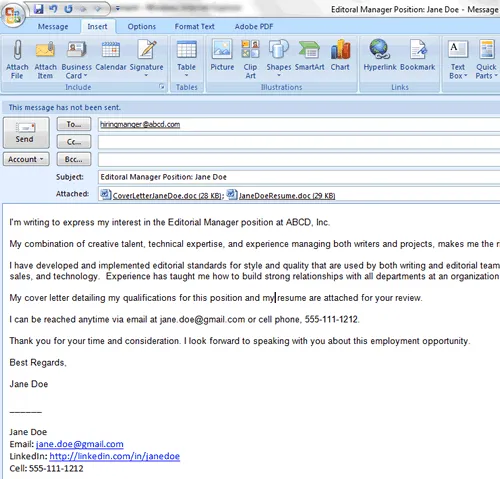
The subject line is the first thing a hiring manager sees, so it’s critical to get it right. A clear, concise, and professional subject line increases the likelihood of your email being opened. Avoid generic phrases like ‘Cover Letter’ or ‘Job Application.’ Instead, include the job title and your name to help the recruiter quickly identify the purpose of the email. This also helps them organize applications effectively. For instance, ‘Software Engineer Application - [Your Name]’ is far more effective than a generic subject line. Always double-check for any specific instructions provided in the job posting, as they might specify a particular subject line format.
Best Practices for Email Body Content

The body of your email serves as your introduction and a brief overview of your qualifications. Start by addressing the hiring manager by name, if possible; this shows you’ve done your research. In the first paragraph, state the position you’re applying for and where you found the job posting. Then, briefly highlight your most relevant skills and experience, aligning them with the job requirements. Keep your email concise, aiming for no more than three to four paragraphs. Express your enthusiasm for the role and the company. End with a call to action, such as thanking the hiring manager for their time and expressing your eagerness for an interview.
Formatting Your Cover Letter for Email
Formatting is critical to ensure your cover letter is easy to read on various devices. Keep your email body’s font simple and readable, such as Arial or Times New Roman, with a font size of 10 or 12 points. Use clear paragraph breaks and bullet points to break up text and make it visually appealing. Avoid using complex formatting that may not translate well across different email clients. However, for the actual cover letter content, create it in a separate document (like a .doc or .pdf) and attach it to the email. The email body should only be a brief introduction and summary, not the entire cover letter.
Attaching Your Cover Letter and Resume
Attaching your cover letter and resume correctly is essential. Always attach your cover letter and resume as separate files. Use professional file names that include your name and the document type, such as ‘YourName_CoverLetter.pdf’ and ‘YourName_Resume.pdf.’ PDF format is generally preferred as it preserves formatting and ensures the documents are viewed correctly on any device. Double-check that both attachments are included before sending your email. A missing attachment can be a major error, so always take a moment to review your email before hitting send.
Proofreading and Sending Your Email Cover Letter

Before sending your email, proofread it carefully for any grammatical errors, spelling mistakes, and typos. These errors can undermine your professionalism and make a negative impression. Read through your email and attachments multiple times, and consider asking a friend or family member to review them as well. Ensure all the information is accurate, including the hiring manager’s name and the company’s details. Once you are confident that your email is error-free, send it during business hours. This is just a standard way to show that you respect their time. Also, keep a copy of the sent email for your records.
Following Up After Sending Your Cover Letter
After sending your email cover letter, it’s appropriate to follow up if you haven’t heard back within a reasonable timeframe. The ideal follow-up time is usually within one to two weeks, but this can vary depending on the job and company. Send a polite follow-up email reiterating your interest in the position and briefly mentioning your relevant qualifications. Keep your follow-up brief and professional. If you still don’t hear back after a second follow-up, it may be time to consider that the employer has moved forward with other candidates, and you should continue your job search elsewhere.
Tips for Sending a Cover Letter with Confidence
Sending a cover letter via email requires attention to detail and professionalism. Always tailor your cover letter to each specific job and company. Research the company and the role to understand their needs and expectations. Customize your cover letter to reflect your understanding. Maintain a professional tone and avoid using casual language or slang. Proofread everything meticulously, and always attach your documents in the correct format. By following these guidelines, you can increase your chances of making a positive impression and securing an interview. Use a professional email address and ensure your email signature includes your contact information.