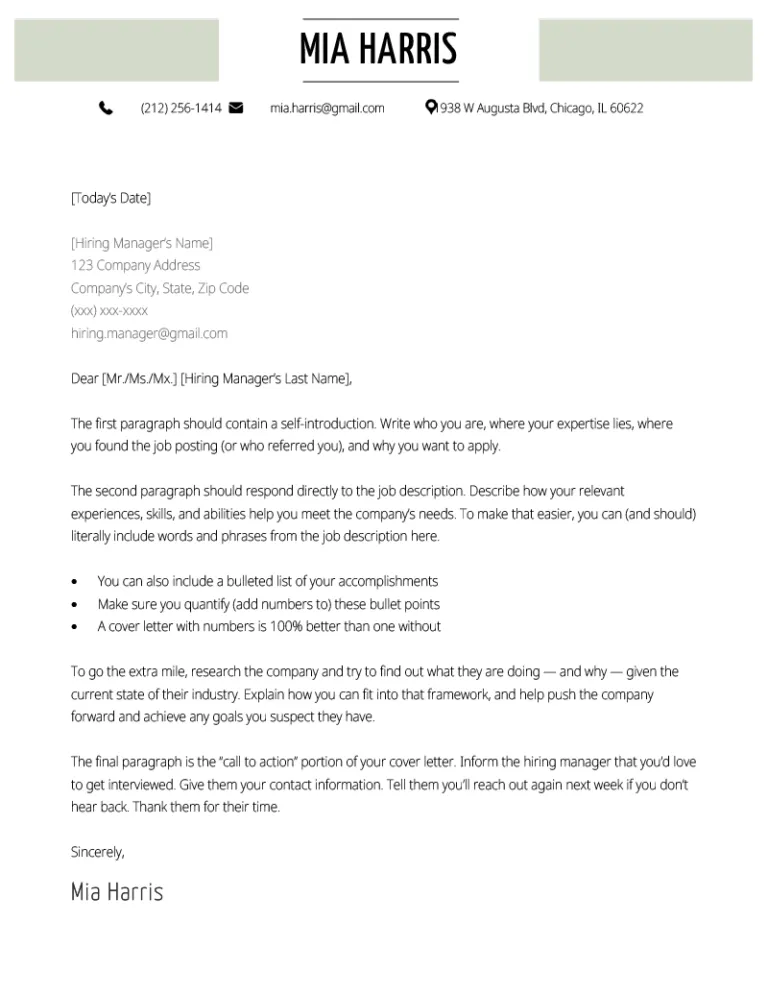
What is a Cover Letter?
A cover letter is a crucial document that accompanies your resume when applying for a job. It serves as a personalized introduction, allowing you to elaborate on your skills, experiences, and qualifications in a way that a resume alone cannot. It provides an opportunity to showcase your personality, express your enthusiasm for the role, and explain why you are a perfect fit for the company. Essentially, a well-crafted cover letter bridges the gap between your qualifications and the employer’s needs, making your application stand out from the competition. It offers a platform to tell your story and demonstrate your genuine interest in the position.
Why is a Cover Letter Important?
In today’s competitive job market, a cover letter is no longer optional; it’s an essential element of a successful job application. Its significance stems from its ability to personalize your application, highlighting how your skills align with the specific requirements of the job and the company’s values. A cover letter allows you to elaborate on your resume, providing context and demonstrating your genuine interest and enthusiasm. It’s a chance to showcase your communication skills, which are highly valued by employers. In essence, a well-written cover letter makes a compelling case for why you should be considered for the role, significantly increasing your chances of landing an interview and ultimately, the job.
Step-by-Step Guide to Making a Cover Letter in Word

Microsoft Word is an excellent tool for creating professional cover letters, offering a user-friendly interface and a range of templates to get you started. This guide will walk you through each step of crafting a compelling cover letter, from choosing a template to formatting and proofreading. Following these steps will help you create a cover letter that effectively showcases your skills, experiences, and genuine interest in the job, thus increasing your chances of making a positive impression on potential employers. We will cover everything from choosing the right template to customizing it with your information, formatting the document, and ensuring it is free of errors.
Open Word and Choose a Template
The first step is to open Microsoft Word on your computer. Once the application is launched, you can either start with a blank document or choose from a variety of cover letter templates. To access templates, navigate to the ‘File’ menu, click ‘New’, and then search for ‘cover letter’ in the search bar. Word will provide a selection of pre-designed templates, each with different layouts and styles. Choosing a template saves you time and provides a professional starting point, ensuring your cover letter has a polished look. Select a template that best fits your needs and the type of job you are applying for. Consider templates that align with your personal brand and the company’s culture.
Customize the Template with Your Information
Once you have chosen a template, it’s time to customize it with your personal and professional information. This involves replacing the placeholder text with your details, ensuring all sections are accurate and up-to-date. This customization process is where you transform a generic template into a unique representation of your skills and experiences. Carefully review each section to ensure it aligns with your qualifications and the specific job you are applying for. Remember, the goal is to create a cover letter that reflects your individual strengths, experience, and enthusiasm for the position. Double-check all information, including contact details, to avoid any errors that could negatively impact your application.
Header Section

The header of your cover letter should include your contact information, such as your name, address, phone number, and email address. This information should be clearly visible at the top, making it easy for the hiring manager to reach you. Consider using a clean and professional font and format for your contact details. The header should be consistent with the information on your resume. Ensure that your email address is professional and that your phone number is up-to-date. This section is often the first impression, so it’s critical to present yourself in a clear and organized manner. Keeping this section concise yet comprehensive ensures that potential employers can easily reach you.
Your Contact Information
In addition to the header, it is good practice to include your contact details within the body of the letter, especially if you are not using a pre-designed template. This reiterates your contact information and makes it readily accessible. Ensure your name, address, phone number, and email address are accurately presented. Use a readable font size and style to maintain consistency. Double-checking this section for accuracy is essential, as errors can lead to missed opportunities. This repetition ensures that even if the header gets separated from the letter, your contact details remain easily available. Consistent presentation helps maintain professionalism.
Date
Include the current date below your contact information or the recipient’s information. The date is essential as it indicates when you are sending the application. Use a consistent format, such as month, day, year. This date is a simple but important detail that provides context. This helps the employer quickly determine when the cover letter was written. It’s a standard practice and contributes to the professional appearance of your letter. Correct and consistent date formatting demonstrates attention to detail, reflecting well on your professionalism.
Recipient’s Information

Address the cover letter to the hiring manager or the specific person listed in the job posting if possible. This personalization demonstrates that you have done your research and are genuinely interested in the role. Include the recipient’s name, title, and the company’s address below the date. If you cannot find a specific name, use a generic salutation such as ‘Dear Hiring Manager’. Personalizing this section makes your application more engaging and shows your attention to detail. It’s a small but significant step towards making a positive first impression. If the name is unavailable, ensure you still address the letter formally to maintain a professional tone.
Salutation
Begin your cover letter with a professional salutation. If you know the hiring manager’s name, use ‘Dear Mr./Ms. [Last Name]’. If not, use ‘Dear Hiring Manager’ or ‘Dear [Company Name] Team’. Avoid generic greetings like ‘To Whom It May Concern’. The salutation sets the tone for your letter, so choose a greeting that is both professional and appropriate for the company’s culture. A personalized salutation demonstrates that you have done your research, while a general greeting shows respect and courtesy. Make sure your salutation matches the tone of the rest of your letter. This is the first opportunity to make a good impression.
Body of the Cover Letter
The body of your cover letter is where you showcase your skills and express your interest in the position. This section typically includes three to four paragraphs, each serving a specific purpose. This area allows you to highlight your qualifications, experiences, and how they align with the job requirements. The body provides an opportunity to tell your story, demonstrate your personality, and illustrate your suitability for the role. Each paragraph should have a clear focus and purpose. Use a tone that is both professional and engaging to keep the reader interested. Keep each paragraph concise and impactful.
First Paragraph Introduce Yourself

In the first paragraph, introduce yourself and state the position you are applying for. Mention where you saw the job posting and express your initial interest in the role and the company. Briefly explain your background and why you are a suitable candidate. The opening paragraph should grab the reader’s attention and create a positive first impression. Highlight your enthusiasm for the position, using a clear and concise style. Keep it short and focused on the essential information. This section sets the stage for the rest of the letter and motivates the reader to continue.
Second Paragraph Highlight Skills
The second paragraph should focus on highlighting your skills and experiences that are relevant to the job requirements. Refer to the job description and identify key skills and qualifications. Provide specific examples of how you have used these skills in previous roles or projects. Quantify your achievements whenever possible. This section is where you showcase your ability to meet the employer’s needs. Tailor this section to the specific job, emphasizing the most relevant skills. Use action verbs to describe your accomplishments and ensure your skills match the job description. This is a chance to explain how your past successes will translate into success in the new role.
Third Paragraph Express Your Interest
The third paragraph should express your interest in the company and explain why you want to work there. Research the company’s values, mission, and culture. Show how your personal values align with the company’s and how you can contribute to their goals. Mention any specific projects or initiatives you admire, demonstrating your knowledge of the company. This paragraph is where you connect with the employer on a more personal level. Demonstrating this genuine interest, reinforces your application’s impact. This section makes your application more compelling, and helps you stand out from other candidates who may have similar qualifications. Showcasing that you have done your research makes you a more attractive candidate.
Closing Paragraph and Call to Action

In the closing paragraph, summarize your interest in the role and express your gratitude for the reader’s time. Reiterate your enthusiasm for the opportunity and your confidence in your ability to contribute to the company. Include a call to action, such as stating that you are available for an interview and providing your contact information again. End with a professional closing, such as ‘Sincerely’ or ‘Best regards’. The closing reinforces your professionalism and reinforces the key points of your cover letter. It leaves the reader with a clear sense of your interest and your readiness to move forward in the hiring process. Make it easy for them to take the next step.
Formatting and Editing
Formatting and editing are critical to creating a professional and polished cover letter. Proper formatting makes your letter easier to read, and careful editing ensures it is free of errors. Paying attention to details like font, margins, and spacing makes your cover letter a better reflection of your professionalism. Errors can easily make an applicant appear inattentive or unprofessional, so take the time to do it right. Ensure that your cover letter looks visually appealing and is easy to navigate.
Font and Style
Choose a professional and easy-to-read font, such as Times New Roman, Arial, or Calibri. Use a font size between 10 and 12 points for readability. Maintain consistency throughout the document, avoiding the use of multiple font styles. Ensure that your font choice reflects a professional image. Avoid fonts that are overly decorative or difficult to read. Consistent formatting helps the reader focus on the content. Selecting the right font can influence the reader’s perception of your application. Your chosen font style should be clear, clean, and modern.
Margins and Spacing
Set margins to 1 inch on all sides of your cover letter. Use single-spacing within paragraphs and double-spacing between paragraphs. This spacing enhances readability and gives the document a clean look. Proper margins and spacing create a balance on the page, making the content easier to digest. The goal is to make the cover letter visually appealing and inviting to read. Poor formatting can make your cover letter appear cluttered and unprofessional. Make sure the spacing is consistent and that there are no inconsistencies.
Proofreading
Proofread your cover letter carefully for any grammatical errors, spelling mistakes, or typos. Use a spell checker and grammar checker, but don’t rely on them completely. Read your cover letter aloud to catch any awkward phrasing or repetitive sentences. Have a friend or family member proofread it as well, as a fresh set of eyes can often spot mistakes you might miss. Proofreading is a critical step to ensure your cover letter is professional. Errors can undermine your credibility and reduce your chances of getting an interview. Taking the time to proofread demonstrates attention to detail.
Saving and Submitting Your Cover Letter
After creating and editing your cover letter, it’s time to save and submit it. Choose a professional file name for your document, such as ‘YourName_CoverLetter’. Save your cover letter in a PDF format to ensure that the formatting remains consistent across different devices and operating systems. When submitting your cover letter, follow the instructions provided in the job posting. If the job posting does not specify a format, PDF is generally preferred. Double-check that the file is correctly attached and that all information is accurate. Ensure the file name is professional and reflects the document’s content. Submitting the cover letter correctly is the final step toward making a successful application.