Understand the Purpose of a Cover Letter
A cover letter serves as your personal introduction to a potential employer, accompanying your resume and offering a glimpse into your personality, skills, and aspirations. Unlike your resume, which provides a factual account of your experience, a cover letter allows you to elaborate on why you are the perfect fit for a specific role and company. It’s a crucial tool for showcasing your communication skills, demonstrating your enthusiasm, and highlighting how your qualifications align with the employer’s needs. Think of it as your chance to make a strong first impression and convince the hiring manager to read your resume with interest. The best cover letters go beyond simply restating information from your resume; they tell a compelling story and establish a connection with the reader. A well-crafted cover letter can significantly increase your chances of getting an interview and landing your dream job.
Essential Elements of a Cover Letter Template
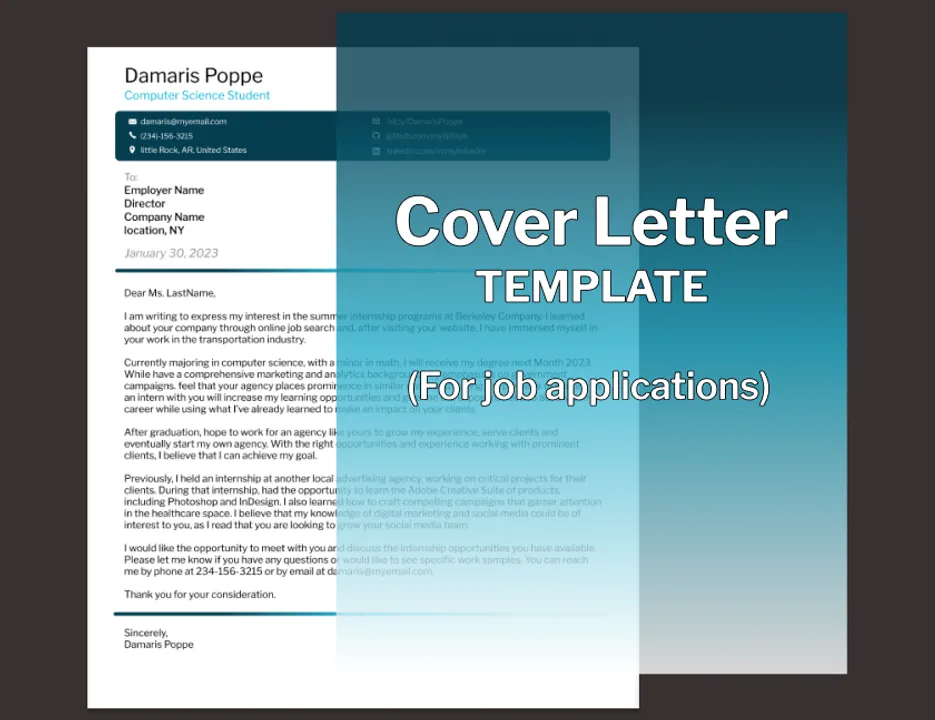
A well-designed cover letter template provides a solid foundation for your job applications, ensuring you consistently present a professional image. The essential elements work together to create a cohesive and impactful document, effectively communicating your value to potential employers. Begin with clear, concise contact information and proceed through a carefully crafted opening that grabs the reader’s attention, and you will be well on your way to securing a new job.
Your Contact Information

At the top of your cover letter, include your full name, phone number, email address, and optionally, your LinkedIn profile URL or personal website. Ensure this information is accurate and easy to read. The contact details should be placed in a prominent and easily accessible location, typically at the top left or right of the document. Using a slightly larger font size for your name can make it stand out. Double-check that the email address you provide is professional and that your voicemail greeting is also professional. This section ensures the hiring manager can easily reach you. Avoid including unnecessary details such as your age or marital status, as these are irrelevant to your qualifications and can sometimes lead to discrimination.
Date and Recipient Information
Following your contact information, include the current date. Below the date, provide the recipient’s name (if known), their title, and the company name. If you can’t find the hiring manager’s name, research the company’s website or LinkedIn to find the relevant contact. Always address your letter to a specific person whenever possible, as it demonstrates that you’ve done your research and are genuinely interested in the position. If a specific name is unavailable, you can use a general greeting such as “Dear Hiring Manager,” but avoid generic salutations like “To Whom It May Concern” which can make your application seem impersonal. Ensure the recipient’s title and company name are accurate to show attention to detail and professionalism. This section sets the stage for a personalized and targeted application.
Professional Salutation
The salutation is the first impression you make after your contact and recipient information. A professional salutation is crucial for setting the tone of your cover letter. Start with “Dear Mr./Ms./Mx. [Last Name]” if you know the hiring manager’s name. Using the correct title and last name shows respect and attention to detail. If you are unsure of the gender, or the name is gender-neutral, using the full name is a safe option. If you are unable to determine a specific name, “Dear Hiring Manager” is an appropriate alternative. Always avoid informal greetings like “Hi” or “Hello” in a professional cover letter. The salutation should be followed by a comma, setting a polite and respectful tone that encourages the reader to continue with interest.
The Opening Paragraph Grab Attention

The opening paragraph is your first opportunity to capture the reader’s attention and make a strong first impression. Start with a clear and concise statement of your interest in the specific position and company. Mention where you found the job posting (e.g., LinkedIn, company website). Briefly state why you are excited about the opportunity and what makes you a strong candidate. Tailor this paragraph to the specific job and company; show that you have researched and understand their needs. Avoid generic openings; instead, demonstrate your enthusiasm and tailor it to each application. This section is about making a memorable first impression and encouraging the reader to learn more about you. A good opening should make the reader want to continue reading, ensuring your resume gets the attention it deserves.
Highlighting Your Skills and Experience
This section is your opportunity to showcase your skills and experience in a way that directly relates to the job requirements. Focus on the most relevant qualifications, and provide specific examples of your achievements. Use action verbs to describe your responsibilities and accomplishments, and quantify your results whenever possible. This section should be focused and tailored to the specific job description. This focused approach helps the hiring manager quickly understand how your skills and experience align with the company’s needs and emphasizes why you are a valuable candidate for the role. The goal is to demonstrate that you not only meet the requirements but also exceed them.
Tailoring Your Letter to the Job Description
Carefully review the job description and identify the key skills and qualifications the employer is seeking. Customize your cover letter to directly address those requirements. Use keywords from the job description throughout your letter, but make sure to incorporate them naturally. Provide specific examples of how your experience matches those requirements, using the STAR method (Situation, Task, Action, Result) to showcase your accomplishments. For example, instead of simply stating “Managed projects,” describe a specific project you led, the challenges you overcame, the actions you took, and the positive results you achieved. Customizing your letter shows that you have taken the time to understand the role and company, and that you are genuinely interested in the opportunity. This approach increases the likelihood that your application will stand out from the generic ones.
Showcasing Achievements and Quantifiable Results

Rather than simply listing your responsibilities, focus on your achievements and the results you have delivered. Whenever possible, quantify your accomplishments with numbers and data. For example, instead of saying “Improved customer satisfaction,” state “Increased customer satisfaction by 15% through implementing a new feedback system.” Use action verbs to describe your accomplishments, and highlight how your skills and experience have benefited previous employers. Provide specific examples that demonstrate your ability to contribute to the company’s goals. This shows that you can deliver tangible results and bring value to the position. Quantifiable results make a stronger impact, as they provide concrete evidence of your capabilities. The focus on achievements will make your letter more compelling and persuasive, helping you to stand out from other applicants.
Addressing the Employer’s Needs
Demonstrate that you understand the employer’s needs and how your skills align with their goals. Research the company and the specific role to understand the challenges and opportunities they face. In your cover letter, address these needs directly, explaining how your skills and experience can help them overcome challenges and achieve their objectives. Show that you are not just looking for a job but also a solution to their needs. Tailor your letter to each application, showing that you have taken the time to learn about the company. Highlight how your skills align with the job requirements, demonstrating that you are a good fit for the position. Addressing the employer’s needs demonstrates that you have a strategic mindset, understand the value of their company, and are genuinely interested in contributing to their success.
Formatting and Design Best Practices
The formatting and design of your cover letter are critical for creating a professional and visually appealing document. A well-formatted cover letter is easy to read and makes a positive impression, reflecting your attention to detail and professionalism. These best practices will help you create a cover letter that looks polished and professional, increasing the chances that it will be read and considered by the hiring manager. Good formatting will make it easy for the reader to quickly grasp the key points and understand your qualifications.
Choosing the Right Font

Select a professional and easy-to-read font for your cover letter. Popular and widely accepted fonts include Times New Roman, Arial, Calibri, and Helvetica. Keep the font size between 10 and 12 points for optimal readability. Avoid using overly decorative or unusual fonts, as they can distract from the content. Ensure consistency throughout the document by using the same font for the entire cover letter. Using a clear, simple font will help make your cover letter look clean and professional, which is critical for readability. Your goal is to ensure the reader focuses on your qualifications, not the design. When choosing a font, consider how it will appear on different devices, such as computers and smartphones, and ensure it remains clear and readable across all platforms.
Maintaining Professionalism in Design
Keep the overall design clean and professional. Avoid using excessive colors, graphics, or unusual formatting, which can distract from the content. Use a simple, clean layout with clear headings and bullet points to organize your information. Ensure proper spacing between paragraphs and sections to make the letter easy to read. Choose a simple, clean template that is easy to read and professional. A professional design shows attention to detail, which is important. When in doubt, choose a simple, clean design that focuses on the content rather than flashy visuals. The goal is to make your letter easy to read and ensure the focus is on your qualifications and experience. Professionalism in design is a key element of a successful job application.
Use Whitespace Effectively
Whitespace is the empty space around text, headings, and other elements in your cover letter. Using whitespace effectively can greatly enhance readability and make your cover letter more visually appealing. Ensure ample spacing between paragraphs, sections, and lines of text. Avoid overcrowding the document with too much text. Adequate whitespace helps the reader’s eye to move through the document more easily, making the content easier to digest. A well-spaced letter looks more polished and professional. Utilizing whitespace ensures that key information stands out and creates a more pleasant reading experience. Well-placed whitespace can significantly increase the overall impact of your cover letter.
Structuring the Closing and Call to Action

The closing of your cover letter is your final opportunity to leave a lasting impression. A strong closing summarizes your interest, reiterates your qualifications, and includes a clear call to action. This section is your chance to reinforce your enthusiasm for the position and encourage the hiring manager to take the next step in the application process. The closing paragraph is about reminding the reader of your value and making it easy for them to consider your application favorably. The goal is to end your cover letter with impact.
Formal Closing and Signature
Use a formal closing such as “Sincerely,” “Best regards,” or “Respectfully” before your signature. Follow the closing with a space for your handwritten signature if you are printing the letter. If you are sending it electronically, type your full name. If you’re sending a digital copy, type your full name, and consider inserting an image of your signature for a more personal touch. Ensure that your closing is polite and professional, reflecting the overall tone of your cover letter. This helps to create a sense of closure. The formal closing and signature add a final touch of professionalism. Maintaining a consistent, professional tone throughout your cover letter is key.
Expressing Gratitude and a Call to Action
In the closing paragraph, express your gratitude for the hiring manager’s time and consideration. Reiterate your interest in the position and briefly summarize your key qualifications. Include a clear call to action, such as “I am eager to discuss my qualifications further in an interview” or “I look forward to hearing from you soon.” Make it easy for the hiring manager to move forward. This includes your contact information in case it is not already listed. A call to action prompts the reader to take the next step, increasing your chances of being considered for the role. The final paragraph is about ending with confidence and enthusiasm, leaving the reader with a positive impression and encouraging them to contact you.
Proofreading and Editing Your Template

Proofreading and editing your cover letter template are essential steps in ensuring your application is polished and professional. Errors in grammar, spelling, or punctuation can create a negative impression and undermine your credibility. Thorough proofreading and editing demonstrate your attention to detail. By carefully reviewing your template, you can correct any mistakes and ensure that your cover letter effectively communicates your skills and qualifications.
Reviewing for Grammatical Errors
Carefully review your cover letter for any grammatical errors, such as incorrect verb tenses, subject-verb disagreements, and incorrect pronoun usage. Use a grammar checker, but do not rely on it entirely. Proofread the document yourself to catch errors that automated tools may miss. Read your cover letter aloud to identify awkward phrasing or sentences. Ensure that your grammar is correct and your sentences are clear and concise, ensuring your message is easily understood. Proper grammar reflects your attention to detail and professionalism, crucial in job applications. Consider asking a friend or family member to review the document to catch errors. Errors can undermine your credibility.
Ensuring Clarity and Conciseness
Ensure your cover letter is clear and concise, avoiding unnecessary jargon or overly complex sentences. Use simple, straightforward language to effectively communicate your ideas. Make sure that each sentence has a clear purpose and contributes to the overall message. Keep your paragraphs short and easy to read. Condense your points to their core meaning without losing important information. A clear and concise cover letter is easier for the hiring manager to understand, highlighting your skills and experience effectively. A well-written cover letter is more likely to make a positive impression. Brevity helps the hiring manager quickly grasp the important information.
Formatting Your Cover Letter Template for Different Applications

Your cover letter template should be adaptable to various job applications, ensuring it meets the specific requirements of each role. Different applications require different formats. Ensure that your template is easily customizable and can be adapted to various formats, as this will help you stand out. Proper formatting ensures that your application will be well-received, regardless of the application method.
Saving Your Template in Various Formats
Save your cover letter template in several formats, such as .docx (Microsoft Word) and .pdf (Portable Document Format). The .docx format allows you to easily edit and customize the template for different applications. Saving your template in the .pdf format preserves the formatting, ensuring that your cover letter looks consistent across different devices and operating systems. Consider saving a plain text version (.txt) if the application instructions require it. Having multiple formats ensures you can adapt to any submission requirements. Choose the format that best suits the application instructions. This flexibility ensures that your cover letter always looks professional.
Adapting Your Template for Online Applications
When submitting your cover letter online, pay close attention to the application instructions. Some online portals require you to copy and paste your cover letter into a text field. In this case, you might need to remove any special formatting and ensure the text is easy to read. For attachments, follow the instructions on the required file format, and use a professional file name. You may need to tailor the content to match the online application form’s specific fields. Always proofread your cover letter after adapting it for online applications. Ensuring your content is accessible and formatted correctly for online submissions demonstrates your ability to adapt and follow instructions. Make sure the information is accurate and formatted correctly.
Examples of Effective Cover Letter Templates
Analyzing different types of templates will help you see how to structure yours. Reviewing a variety of template examples will provide you with insights on how to structure your own cover letter and create a polished document. There are several template options to help you, depending on your needs. These examples demonstrate how to present your qualifications effectively, depending on your goals and the role. These are designed to accommodate your individual needs and help you make a positive impact.
Template 1 Experience Focused
This template emphasizes your previous experience, focusing on your accomplishments and the results you achieved in past roles. It is especially suitable if you have a strong employment history and want to highlight your proven track record. Structure your letter to demonstrate how your past experiences align with the job’s requirements, giving examples of specific projects and how they relate. This template is ideal for candidates with extensive experience in the field. Use this template to give specifics to your experience and show how it will help your job. Show how your skills match the job description.
Template 2 Skills Focused
This template prioritizes your skills and capabilities, especially relevant if you are transitioning careers or have a diverse skill set. Structure your letter around the key skills required for the job. Provide examples of how you have used these skills in different contexts. This is a good choice if your experience is not directly related to the job. Showcase transferable skills that align with the job requirements. Use this to demonstrate your value, even without related experience. The focus is on what you can bring to the role, using your skills to help make your pitch. Focus on why you can excel in the role.
Template 3 Combination Approach
This template balances your experience and skills, giving a well-rounded overview of your qualifications. It’s a versatile option that works for most job applications. Structure your letter by highlighting key experiences while also showcasing your relevant skills. Integrate your experience and abilities to demonstrate that you are a well-rounded candidate. This approach is suitable for most candidates, highlighting both your skills and your experience. This will show a combination of your work history and your skills. The key is to create a strong impression. This template is an excellent option to get your foot in the door and show off your talents.